
Your users ask.Smart Assistant does the work.
A plug-and-play assistant that executes what your users need, taking their permissions into account.
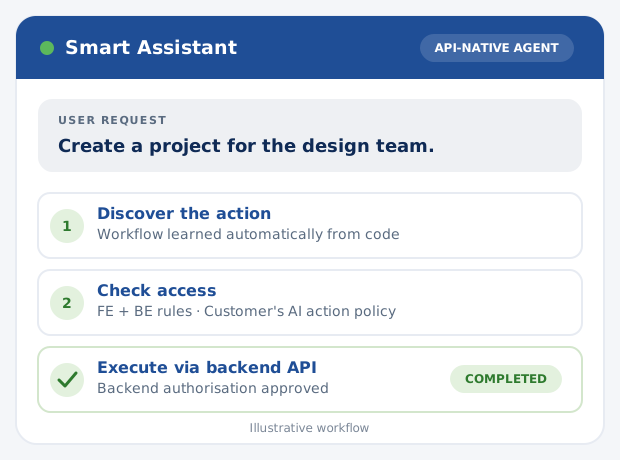
A chatbot answers. Smart Guide shows the way. Smart Assistant completes the work via APIs and backend actions. All three experiences can rely on the same continuously updated understanding of your application.
- 1A user asks for an outcome, not a list of clicks
- 2Smart Assistant automatically discovers the available actions and access rules from code
- 3It invokes the backend action only when the backend authorises it and the customer's AI-specific rules allow it
Less clicking. More WORK DONE
Illustrative requests: available actions depend on your application's APIs, backend capabilities and configured access policy.
Complete a setup task
Instead of explaining every screen, the assistant can carry out a supported invitation workflow for an authorised user.
Execute a workflow
Turn a natural-language request into the relevant steps of a workflow your software already supports.
Work in context
Use application APIs and backend actions instead of simulating clicks through the interface.
It learns your software FROM THE CODE
A useful agent needs more than a chat window or a static knowledge base. It needs to understand how the product actually works.
- 1
Connect your software
Start with the same code-derived knowledge layer that powers Smart Documentation and Smart Guide. No separately authored library of product explanations is required.
- 2
Understand workflows and both permission layers
Smartdoxx automatically discovers actions, workflows and frontend/backend access rules from code. Customers can review and adjust the resulting configuration.
- 3
Execute through APIs and backend actions
Smart Assistant maps the user's goal to supported backend operations. The customer's AI-specific policy can further restrict actions, while backend authorisation remains the final enforcement boundary.
- 4
Keep up with releases
As the product changes, the shared knowledge layer can be regenerated from the codebase, reducing separate maintenance.
Plug-and-play for COMPLEX SOFTWARE
Your existing application already knows what it can do. Smart Assistant turns that knowledge into safe, useful actions without a second set of manually maintained workflows.
Discovered from code
Actions, workflows, roles and permissions are detected automatically and stay aligned with product changes.
Executed through APIs
User requests become backend actions, without fragile screen automation or manually authored product tours.
Controlled by you
Choose the frontend/backend policy, restrict individual AI actions and keep backend authorisation as the final boundary.
One agent. YOUR ACCESS POLICY.
Smart Assistant automatically discovers frontend and backend access rules. The software provider chooses how to combine them and can disable individual AI actions. Backend authorisation always remains the final execution boundary, regardless of the selected policy.
Backend policy
Use backend-defined access rules as the reference for the agent's available actions.
Frontend policy
Use frontend-defined rules to decide which actions the assistant offers, without bypassing backend authorisation.
Most restrictive
Allow an action only when both frontend and backend permission models permit it.
Least restrictive
Consider an action when either permission model permits it; backend authorisation must still approve execution.
A user may delete. The AI does not have to.
If the software permits a user to delete a project, Smartdoxx can discover that action and its permissions. The customer can still disable project deletion specifically for Smart Assistant without removing the user's normal interface access.
Automatic discovery, optional overrides
Actions and permissions are discovered from code by default. Customers can review the configuration and restrict what the assistant is allowed to execute.
Three products. ONE SOURCE OF PRODUCT KNOWLEDGE.
Choose the level of help your users actually need.
Smart Documentation
Explain how the software works in continuously updated documentation, with an MCP endpoint for AI tools.
Read about Smart Documentation →Smart Guide
Show users where to click and guide them through the task on screen, while they remain in control.
Read about Smart Guide →Smart Assistant
Take the next step: execute supported tasks for the user, based on product workflows and applicable permissions.
Why execution changes THE USER EXPERIENCE
The goal is not just a quicker answer. It is fewer repetitive steps between a user's request and a completed task.
Less friction
Ask for the result in ordinary language instead of navigating several screens.
Less manual maintenance
Reuse code-derived product knowledge across documentation, guidance and execution.
More self-service
Allow users to complete supported requests directly in the product rather than asking someone to do it for them.
QUESTIONS about Smart Assistant
The essential differences and technical questions to ask when evaluating an in-app AI agent.
What is Smart Assistant?
Smart Assistant is a plug-and-play, in-app AI agent that understands requests in natural language and executes supported tasks in software using product knowledge derived from its codebase.
How is Smart Assistant different from Smart Guide?
Smart Guide explains the workflow and highlights where the user should click. Smart Assistant can perform supported actions for the user instead of only showing the steps.
Does Smart Assistant discover actions automatically or must we configure them?
Smartdoxx automatically discovers actions, workflows and their associated roles and permissions from the application's code. Customers can review and manually adjust the discovered configuration if they wish.
How does Smart Assistant handle frontend and backend permissions?
Smart Assistant automatically discovers frontend and backend permissions. The software provider chooses backend, frontend, most restrictive or least restrictive rules for which actions the assistant considers available. These settings never bypass backend authorisation: the backend must approve every executed action. Customers can also explicitly disable individual AI actions.
Do we have to write product tours for every workflow?
No. Smart Assistant uses the shared code-derived knowledge layer. Unlike manually authored product tours, it is designed to discover and follow the workflows already implemented in your software.
What happens when our application changes?
The shared Smartdoxx knowledge layer can update from your code as releases change workflows, so guidance and execution can stay aligned with the current product.
Can we block a specific AI action even if the user can perform it in the interface?
Yes. For example, a user may be allowed to delete a project through the normal interface, while the customer explicitly disables project deletion through Smart Assistant. The assistant's allowed actions are independently configurable.
Does Smart Assistant click buttons in the user interface?
No. Smart Assistant executes supported operations via application APIs and backend actions rather than simulating user clicks. Smart Guide is the separate product for on-screen guidance.
Can it perform every action automatically?
It can execute supported actions exposed by the application when the customer has not disabled them for the assistant and the backend authorises execution. A frontend-only or least-restrictive discovery policy never overrides a backend denial.
Don't just explain the task. GET IT DONE.
See how Smart Assistant can execute supported user requests inside your software, using knowledge learned from your code.